Promise는 무엇인가?
JavaScript(React)에서 Promise는 비동기 처리에 활용되는 객체입니다. 여기서 비동기 처리란 line by line 순차적으로 특정 코드의 실행을 끝까지 기다리지 않고 다음 코드를 선제적으로 처리하는 것을 의미합니다.
Promise의 역할
Promise는 주로 웹 서비스 구현 시 원활한 데이터 통신을 위해 활용됩니다. 더욱 구체적으로 말씀드리자면, 서버에 데이터를 요청했을 때, 데이터가 모두 받아오기 전에 웹에 출력하려고 할 때 발생하는 오류를 방지하기 위해 활용됩니다. 즉, Promise 객체는 A, B, C 로직이 있을 때, A 로직이 모두 완료될 때까지 B, C 로직을 대기시키지 않고 실행시키는 데 주로 활용됩니다.
Promise의 상태(State)
Promise 객체가 생성되고 종료될 때까지는 아래와 같이 3가지 상태(state)를 갖습니다. 여기서 상태란 Promise의 처리 과정(process)을 의미합니다. 각각에 대해 알아보겠습니다.
| 상태(State) | 설명 |
| Pending(대기) | 비동기 로직 처리의 미완료 상태 |
| Fulfilled(이행) | 비동기 로직 처리가 완료된 상태로 Promise 결괏값 반환 상태 |
| Rejected(실패) | 비동기 로직 처리의 실패 또는 오류 상태 |
Pending(대기)
아래와 같이 Promise 객체를 생성하면 대기(Pending) 상태입니다.
new Promise();아래와 같이 new Promise() 메서드 호출 시 콜백 함수를 선언할 수 있으며, 인자는 resolve와 reject입니다.
new Promise((resolve, reject) => {});Fulfilled(이행)
아래와 같이 콜백 함수 인자인 resolve를 실행하면 이행된(Fulfilled) 상태입니다. 참고로, 이행된 상태를 다른 말로 완료된 상태라고도 합니다.
new Promise(function(resolve, reject) {
  resolve();
});
이행 상태가 되면 then()을 활용하여 결괏값을 받을 수 있습니다.
function getData(){
    return new Promise( (resolve, reject) => {
      let data = 10;
      resolve(data);
    })
  }

getData().then((resolvedData) => console.log(resolvedData));
실행결과
10Promise 객체 연결
then() 메서드가 호출되면 새로운 Promise 객체가 반한됩니다. 즉, then() 메서드를 활용하여 여러 Promise 객체를 연결할 수 있으며, then() 메서드 활용 개수 제한은 없습니다. 아래 예시를 살펴보겠습니다. 비동기 로직 처리에 사용되는 setTimeout() API를 활용하여 2초 후에 실행되어 then() 메서드가 실행될 때마다 결괏값을 1씩 더해주는 로직입니다.
function increment(){
    return new Promise( (resolve) => {
        setTimeout(function() {
            resolve(1);
          }, 2000);
        })
        .then(function(res) {
          console.log(res); // 1
          return ++res;
        })
        .then(function(res) {
          console.log(res); // 2
          return ++res;
        })
        .then(function(res) {
          console.log(res); // 3
          return ++res;
        })
        .then(function(res) {
            console.log(res); // 4
            return ++res;
        })
        .then(function(res) {
            console.log(res); // 5
        });
    }

increment();
실행결과
1
2
3
4
5
Rejected(실패)
Promise 객체의 인자인 reject는 호출 시 실패(Rejected) 상태가 됩니다.
new Promise(function(resolve, reject) {
  reject();
});
resolve와 마찬가지로, 실패 상태가 되면 catch()를 활용하여 결괏값을 받고 예외 처리할 수 있습니다.
function getData(){
    return new Promise( (resolve, reject) => {
      reject(new Error("This is rejected!"));
    })
  }

getData().catch((err) => console.log(err));
실행 결과
Error: This is rejected!
    at C:\VSCode\Test01\sample01.js:3:14
    at new Promise (<anonymous>)
    at getData (C:\VSCode\Test01\sample01.js:2:12)
    at Object.<anonymous> (C:\VSCode\Test01\sample01.js:7:1)
    at Module._compile (node:internal/modules/cjs/loader:1101:14)
    at Object.Module._extensions..js (node:internal/modules/cjs/loader:1153:10)
    at Module.load (node:internal/modules/cjs/loader:981:32)
    at Function.Module._load (node:internal/modules/cjs/loader:822:12)
    at Function.executeUserEntryPoint [as runMain] (node:internal/modules/run_main:81:12)
    at node:internal/main/run_main_module:17:47
활용 예시
reject() 메서드는 예외 발생 시 catch()를 활용해 결괏값을 받고 처리할 수 있다고 했습니다.
Promise 객체에서 조건식에 따라 then() 메서드 또는 catch() 메서드를 활용하여 로직을 처리할 수 있습니다.
아래는 Promise 객체에서 조건식에 따라 다른 결괏값을 출력하고 어떤 로직이 처리되었는지 확인하는 간단한 코드입니다.
import React, { Component } from 'react';
class App extends Component {
  f1 = () => {
    new Promise( (resolve, reject) => {
      if ( 3 > 4 ){
        resolve(100);
      } else {
        reject(200);
      }
    })
    .then((result) => {
      console.log("resolve: ", result);
    })
    .catch((result) => {
      console.log("reject: " ,result);
    })
  }

  render() {
    return (
      <div>
        <button onClick={this.f1}>버튼1</button>
      </div>
    );
  }
}

export default App;
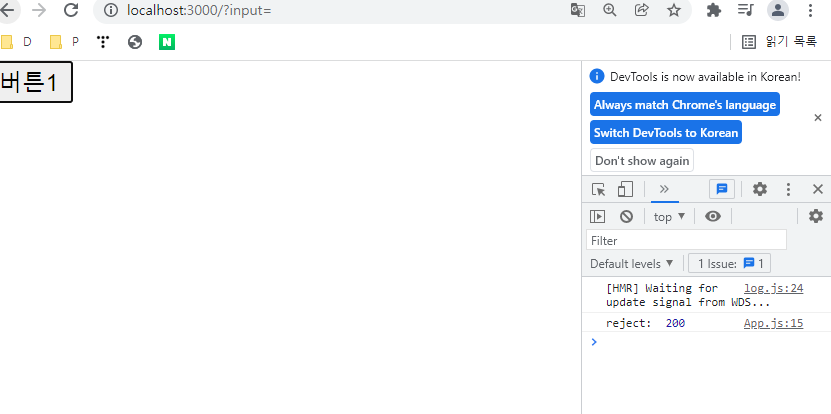
실행결과
웹 상에 버튼을 클릭한 후 console을 확인하면 reject 메서드가 실행되는 로직에 따른 값이 출력되는 것을 알 수 있습니다.
출처
https://heytech.tistory.com/245
'TIL' 카테고리의 다른 글
| TIL JS 유용한 배열 메소드 정리 (0) | 2022.10.24 |
|---|---|
| TIL Props와 State (0) | 2022.10.22 |
| TIL JS ES6 구조분해 할당 정리 (0) | 2022.10.20 |
| ES6의 호환성 해결방법은?, babel, Webpack 이란 ? (0) | 2022.10.19 |
| TIL Array(배열) vs Linked List(연결리스트) (0) | 2022.10.19 |